
Ecommerce calculator guide
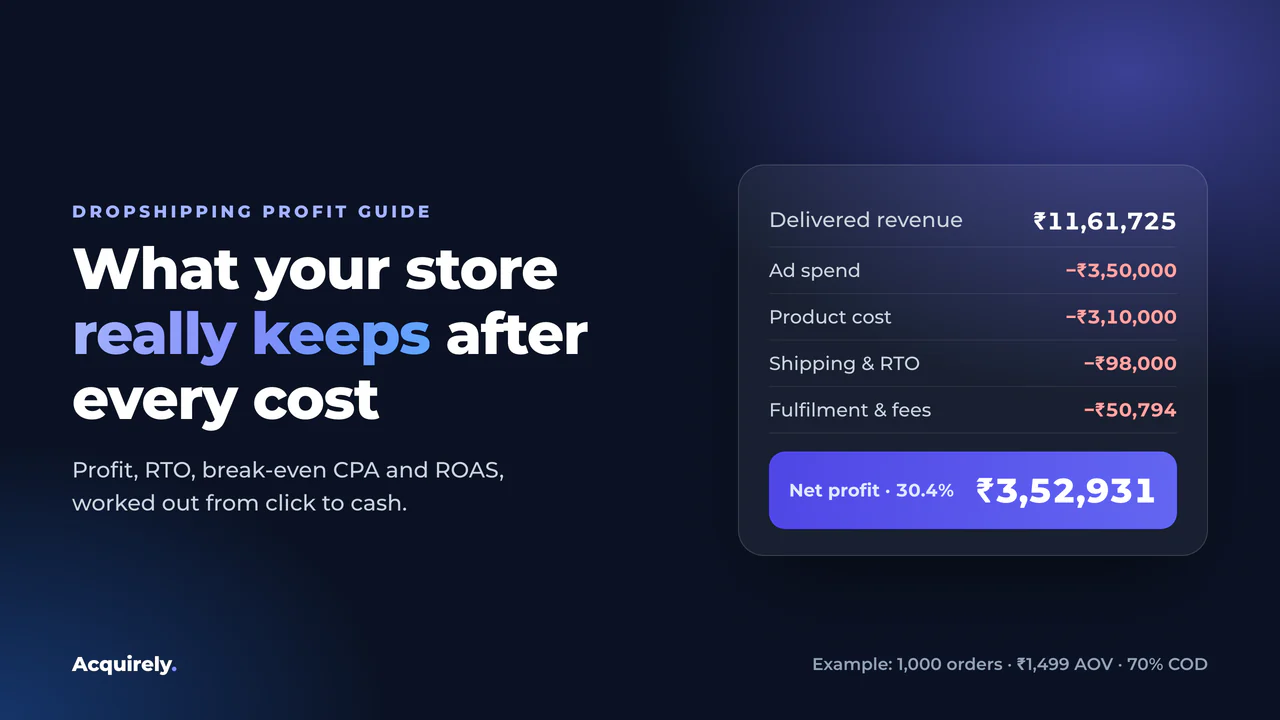
Read this before you raise your ad budget, because a store can show a strong ROAS in Meta Ads and still lose money once shipping, RTO and fees are paid.
An ecommerce calculator turns your orders, prices, costs and ad spend into net profit, margin, ROAS and break-even numbers. To calculate ecommerce profit, take revenue from delivered orders and subtract product cost, ads, shipping, RTO, fees and fixed costs. Your break-even CPA is the most you can pay per order before that profit hits zero.
In this guide you'll see how each ecommerce metric is calculated, with worked examples taken straight from the calculator above.
You'll learn the difference between gross and net margin, how RTO and COD change your profit, and how to find your break-even CPA and ROAS. Try your own numbers in the ecommerce calculator as you read.
What Is an Ecommerce Calculator?
An ecommerce calculator is a free online tool that shows whether your store, product or campaign makes money. You enter orders, prices, costs and ad spend. It returns net profit, profit margin, ROAS and the break-even numbers you need before scaling ads.
Most free ecommerce calculators answer one question at a time. This one connects them, so a change in delivery rate or CPA flows through to profit, margin and break-even in one step.
| Ecommerce calculator | What it tells you | In this tool |
|---|---|---|
| Profit calculator | What you keep after every cost | Net profit per month and per order |
| Profit margin calculator | Profit as a share of revenue | Net margin on delivered revenue |
| ROAS calculator | Revenue per rupee of ad spend | ROAS on delivered revenue |
| Break-even calculator | The ad cost where profit hits zero | Break-even CPA and ROAS |
| COD and RTO calculator | What failed deliveries cost you | Separate COD and prepaid rates |
| Pricing calculator | What price to charge | Test prices by changing order value |
| Marketplace fee calculator | Amazon, Flipkart or Meesho fees | Add fees as other cost per order |
| Shipping rate calculator | Courier price per parcel | Use your courier's rate card |
How the Ecommerce Calculator Works
This ecommerce calculator turns the numbers you already track into one answer: after every cost, is this product making money?
Your ads dashboard can't tell you that, because it has no idea how many orders were actually delivered. This calculator follows an order from click to cash:
- Orders generated: what your ads and store produce in a month.
- Cancellations: orders dropped before dispatch, for example after a failed confirmation call.
- Dispatched orders: split into COD and prepaid by your order mix.
- Delivered orders: dispatched orders multiplied by the delivery rate for each payment type. The rest come back as RTO.
- Revenue and costs: each cost is charged at the stage where it actually happens.
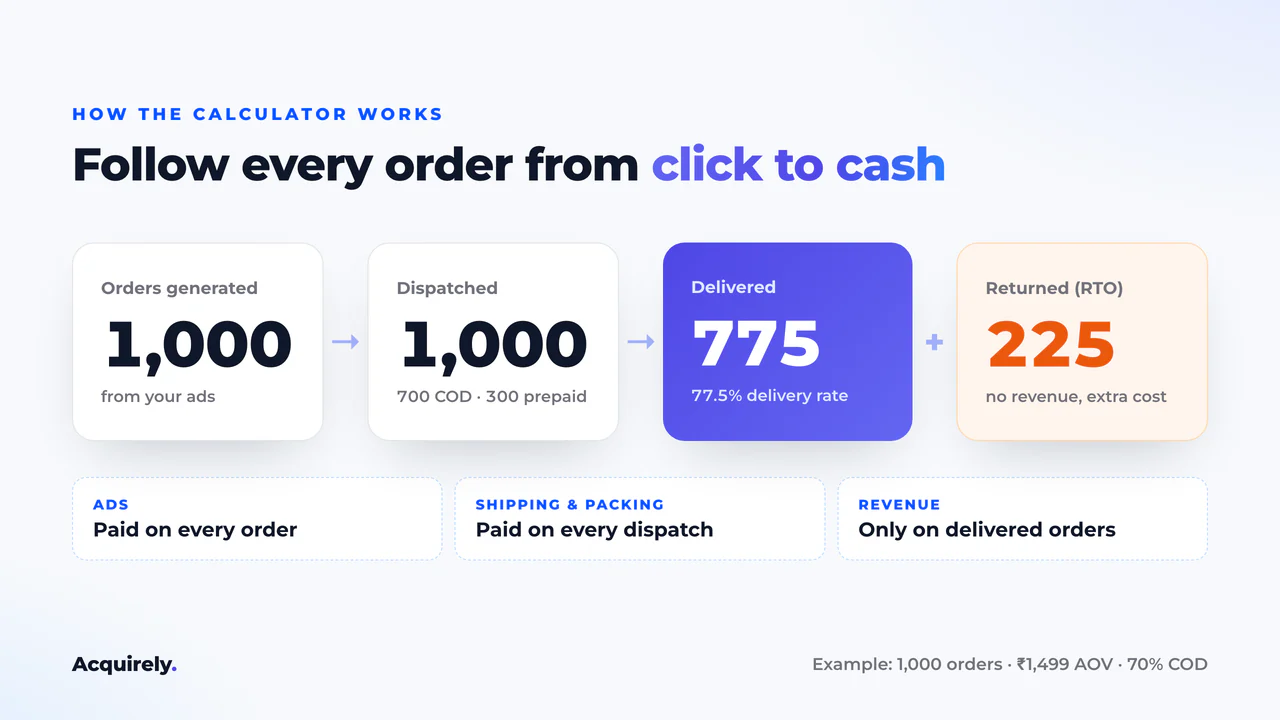
That last step is where most spreadsheets go wrong. Ad spend is paid on every order. Shipping and packing are paid on every dispatched order. Revenue only arrives on delivered orders.
Mix up those three bases and a losing product can look healthy.
How to Calculate Ecommerce Profit
To calculate ecommerce profit, take delivered revenue and subtract everything it cost to get there:
Delivered revenue = delivered orders × average order value Net profit = delivered revenue − product cost − ad spend − forward shipping − RTO shipping − fulfilment − COD fees − payment gateway fees − other per-order costs − fixed costs
Each cost uses its own base:
| Cost | Charged on |
|---|---|
| Advertising (CPA) | Every generated order |
| Forward shipping, fulfilment, other costs | Every dispatched order |
| RTO shipping | Every failed delivery |
| COD fee | Delivered COD orders |
| Payment gateway | Delivered prepaid revenue |
| Product cost | Delivered or dispatched (your choice) |
Revenue is not profit
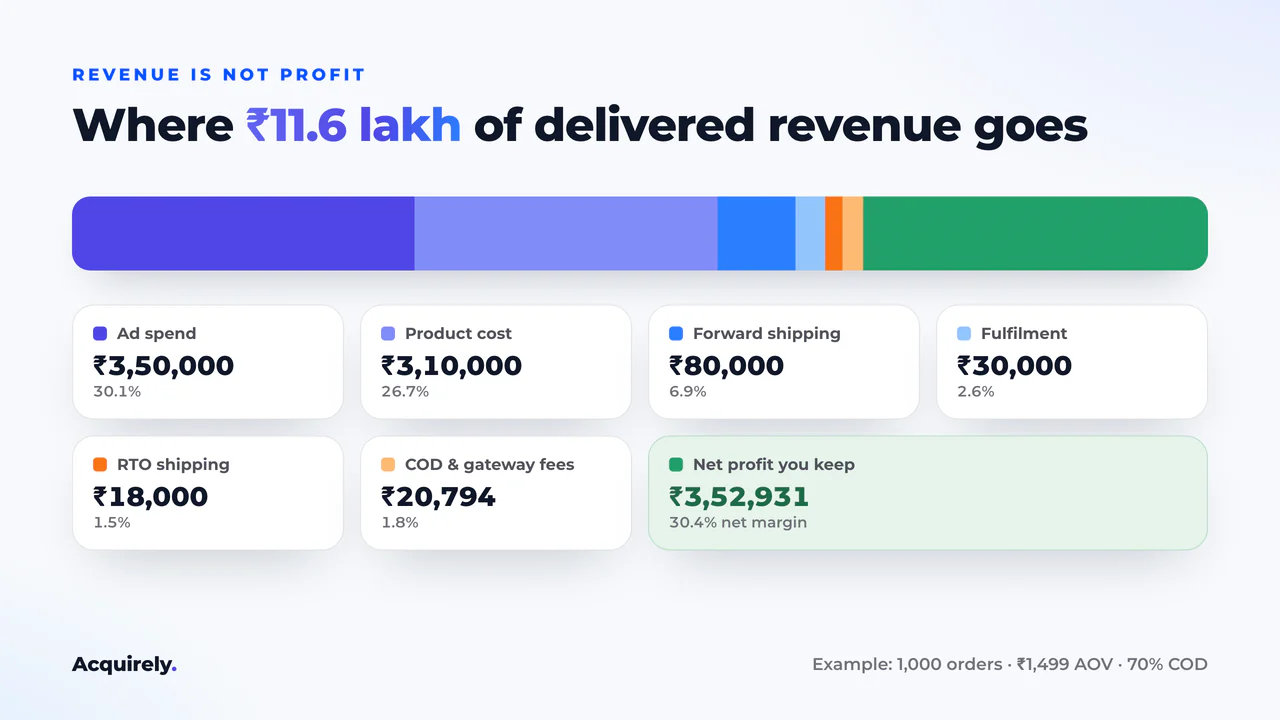
Revenue tells you how much money moved through your store. Profit is what you keep.
A store doing ₹10 lakh a month in delivered revenue can easily keep less than ₹1 lakh once ads, shipping and returns are paid. Net margin (net profit ÷ delivered revenue) shows whether growth is worth it.
Ecommerce Profit Margin: Gross vs Net
The main difference between gross margin and net margin is which costs you subtract. Gross margin only removes product cost. Net margin removes every cost, including ads, shipping, RTO, fees and fixed costs.
Gross margin = (price − product cost) ÷ price × 100 Net margin = net profit ÷ delivered revenue × 100
The calculator's example product sells for ₹1,499 and costs ₹400. Its gross margin is 73.3%. After ads, shipping, RTO and fees, the store keeps a net margin of 30.4%. Plan your ad budget on the second number, not the first.
What is a good ecommerce profit margin?
A good ecommerce profit margin is one that survives a bad month. There's no single target, because category, price, ad costs and COD share all change it.
A safer test is to stress your numbers. In the example, a 20% jump in CPA (₹350 to ₹420) drops net margin from 30.4% to 24.4%. The store is still comfortably profitable.
The calculator flags any result within 5% of zero as near break-even. If one bad week of CPA or RTO would push you there, fix the margin before you scale.
Markup vs margin
Markup is profit divided by cost. Margin is profit divided by selling price. A product bought at ₹400 and sold at ₹1,000 has a 150% markup but only a 60% gross margin.
Always plan ad budgets on margin. Planning on markup makes every product look far more profitable than it is.
How product cost affects contribution margin
Contribution margin is what each order leaves you after its variable costs and before fixed costs. Product cost is usually the largest piece after ads, so small changes matter.
With the example values in the calculator (1,000 orders, ₹1,499 AOV, 70% COD), raising product cost from ₹400 to ₹550 lowers estimated net profit from about ₹3.53 lakh to ₹2.37 lakh. Break-even CPA falls from ₹703 to ₹587. A ₹150 supplier increase takes ₹116 off the most you can pay per order in ads.
The "Charge product cost on" setting matters here too. If returned units are resold, charge product cost on delivered orders only.
If returns are often damaged, or your supplier bills every dispatched unit, charge it on all dispatched orders.
How RTO Impacts COD Profitability
RTO (return to origin) happens when a COD customer refuses the parcel or can't be reached. By then you have already paid for the ad click, the product pick, the packing and the outbound shipping.
Then you pay again for the parcel to come back, and you collect nothing. That's why delivery rate matters so much for COD sellers: a lower rate cuts revenue and adds costs at the same time.
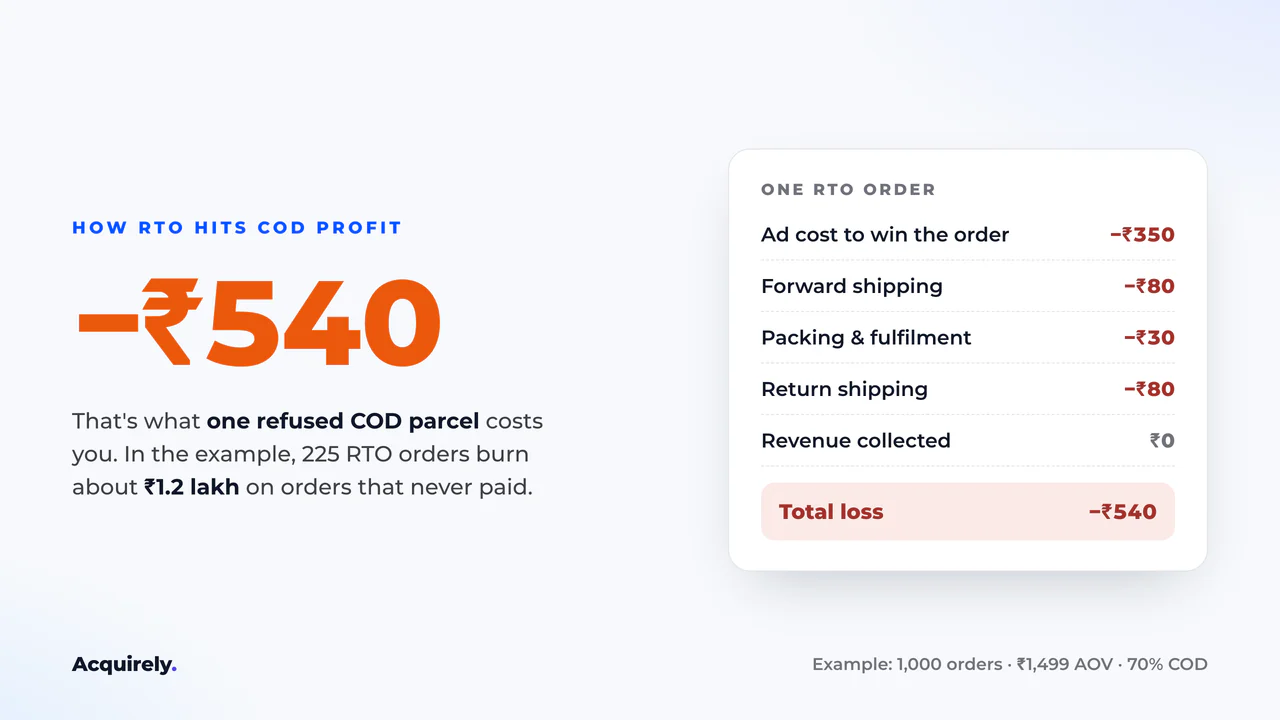
Keep every other example value the same and drop COD delivery rate from 70% to 55%. Delivered orders fall from 775 to 670, RTO cost rises from ₹18,000 to ₹26,400, and estimated net profit falls from about ₹3.53 lakh to ₹2.32 lakh. If returned stock also can't be resold, profit drops to about ₹1.0 lakh.
COD vs Prepaid Orders: What's the Difference?
The main difference between COD and prepaid orders is when the money arrives. Prepaid customers pay at checkout, so most parcels are delivered and the main cost is a gateway fee. COD customers pay on delivery, which lifts conversion but brings more RTO and a flat COD fee.
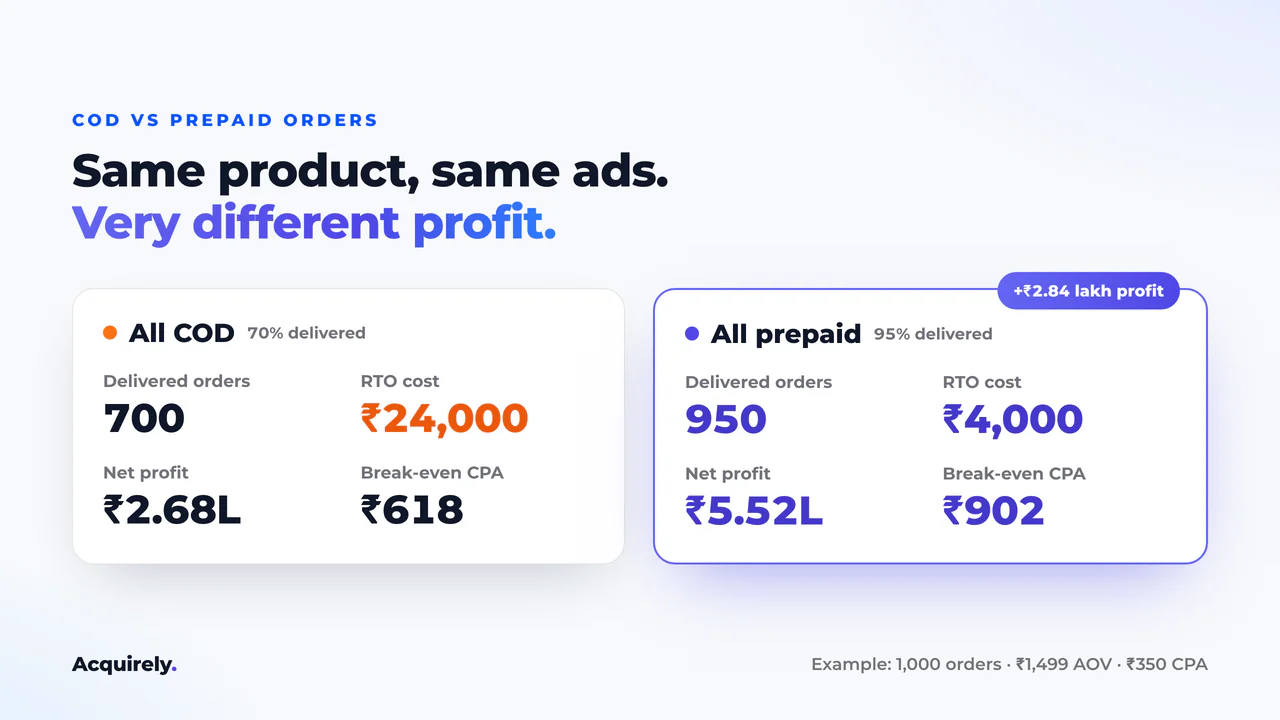
| Factor | 💵 COD | 💳 Prepaid |
|---|---|---|
| When you get paid | After delivery, via the courier | At checkout |
| Conversion rate | Usually higher | Usually lower |
| Delivery rate (example) | 70% | 95% |
| Payment fee | Flat COD fee per delivered order | Gateway % of revenue |
| RTO cost on 1,000 orders | ₹24,000 | ₹4,000 |
| Net profit on 1,000 orders | ₹2.68 lakh | ₹5.52 lakh |
| Break-even CPA | ₹618 | ₹902 |
The last three rows compare an all-COD mix with an all-prepaid mix, keeping every other example value the same. Switching the whole mix to prepaid lifts delivered orders from 700 to 950.
That's why many Indian D2C brands offer a small prepaid discount: it often costs less than the RTO it prevents. Use the COD share and the two delivery-rate fields to test a prepaid incentive before you launch it.
How to Calculate Break-Even CPA
CPA (cost per acquisition) is your ad spend divided by the orders it generated. In Meta Ads this is usually "cost per purchase"; in Google Ads, "cost per conversion".
Break-even CPA is the highest CPA at which you still make zero profit, not a loss. To find it, work out what one generated order is worth before advertising:
Contribution per order (before ads) = AOV × delivered share − product cost − shipping − RTO − fulfilment − COD fee − gateway fee − other costs (each per generated order) Break-even CPA = contribution per order − (fixed costs ÷ orders) CPA headroom = break-even CPA − current CPA
Because delivery rate is built in, break-even CPA is often far lower than sellers expect. In the default example it's ₹703 on a ₹1,499 product.
Positive headroom means you have room to scale into higher CPAs. Negative headroom means every extra order loses money under your assumptions.
How to Calculate Break-Even ROAS
ROAS (return on ad spend) is revenue divided by ad spend. This calculator uses delivered revenue. That's usually lower than the purchase value your ad platform reports, because the platform counts orders that later go RTO.
Break-even ROAS is the ROAS at which net profit is zero:
Break-even ad spend = orders × break-even CPA Break-even ROAS = delivered revenue ÷ break-even ad spend
In the example, current ROAS is 3.32x and break-even ROAS is 1.65x. If break-even ad spend is zero or negative, the product can't break even at any ad cost, and the calculator says so instead of showing a meaningless number.
Why the "1 ÷ margin" shortcut fails for COD stores
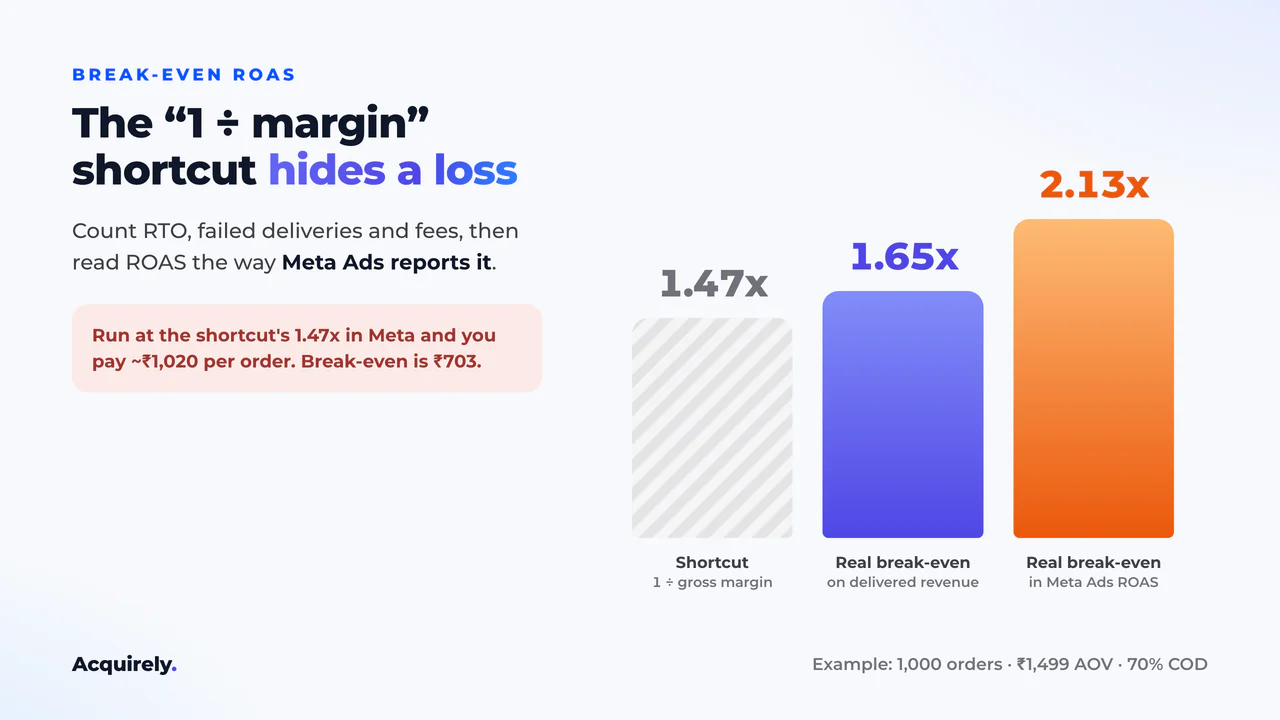
Many ROAS calculators use break-even ROAS = 1 ÷ gross margin. On the example product (₹1,499 price, ₹400 product cost, ₹80 shipping) that gives a 68% margin and a break-even ROAS of 1.47x.
The shortcut ignores RTO, failed deliveries and fees. Counting them, the real break-even is 1.65x on delivered revenue.
Meta Ads reports ROAS on every purchase, delivered or not. In those platform terms the same product needs 2.13x just to break even.
Run it at the 1.47x the shortcut suggests and you pay about ₹1,020 per order against a break-even CPA of ₹703. Every sale loses money.
Using the calculator before scaling Meta or Google Ads
- Pull the last 30 days of orders, AOV and COD share from your store.
- Get delivery rates by payment type from your courier or shipping aggregator. Use settled numbers, not in-transit.
- Enter your actual cost per purchase from the ad platform as CPA.
- Check CPA headroom. Scaling usually raises CPA, so small headroom means little room to grow.
- Set your ad platform's target ROAS or cost cap using platform-reported numbers, adjusted for your delivery rate.
Rerun the numbers whenever your courier, product cost or COD share changes.
How to Price a Product With the Calculator
Price is the lever most sellers test last, but it moves profit fastest. Every extra rupee of price on a delivered order goes straight to profit, while most costs stay the same.
Keep every other example value the same. At ₹1,299, estimated net profit is about ₹1.99 lakh. At ₹1,499 it's ₹3.53 lakh, and at ₹1,699 it's ₹5.07 lakh. Break-even CPA moves from ₹549 to ₹703 to ₹857.
A higher price can lower your conversion rate, which raises CPA. So change the average order value and the CPA together, and check which combination leaves the most headroom.
Using the Calculator for Shopify, Amazon, Flipkart and Meesho
The calculator doesn't connect to any platform, so it works with any store or marketplace. Map each fee to the closest field:
- Shopify or WooCommerce: enter your payment gateway percentage, and add app or platform fees as other cost per order.
- Amazon, Flipkart or Meesho: convert commission and closing fees to rupees per order, then enter them as other cost per order.
- Fixed costs: add your plan fees, staff and software as monthly fixed costs.
A 10% commission on the ₹1,499 example product is about ₹150 per order. Adding it cuts estimated net profit from ₹3.53 lakh to ₹2.03 lakh, and break-even CPA from ₹703 to ₹553.
Other cost per order is charged on every dispatched order, so this is a slightly cautious estimate. Check each marketplace's own fee page for exact rates.
Who This Ecommerce Calculator Is For
- D2C brands and dropshippers selling on Shopify, WooCommerce or their own store.
- Marketplace sellers on Amazon, Flipkart or Meesho who want profit after every fee.
- COD-heavy sellers, especially in India, where RTO decides whether a product makes money.
- Media buyers who need a break-even CPA or ROAS target before scaling Meta or Google Ads.
If your numbers show thin or negative headroom, adjust one input at a time to see which lever moves profit most. Want a second pair of eyes? Ask us for a profitability audit.
Frequently Asked Questions
What is an ecommerce calculator?
An ecommerce calculator is a free tool that turns your orders, prices, costs and ad spend into the numbers that decide if your store makes money: net profit, profit margin, ROAS and break-even CPA. You use it before you raise ad budgets, change a price or switch couriers, so you see the outcome first.
How do I calculate ecommerce profit?
To calculate ecommerce profit, start with revenue from delivered orders only. Subtract product cost, ad spend, forward shipping, RTO shipping, fulfilment, COD fees, payment gateway fees, other per-order costs and fixed costs. What remains is your net profit. Divide it by delivered revenue to get your net profit margin.
What is a good profit margin for ecommerce?
A good ecommerce profit margin is one that survives a bad month. There is no single number, because category, price, ad costs and COD share all change it. Test it: raise your CPA by 20% in the calculator. If net margin stays well above 5%, you have room to scale.
What is the difference between gross margin and net margin?
The main difference between gross margin and net margin is which costs you subtract. Gross margin only removes product cost. Net margin removes every cost, including ads, shipping, RTO, fees and fixed costs. A ₹1,499 product with ₹400 product cost has a 73% gross margin but can keep only 30% as net margin.
What is the difference between markup and margin?
The main difference between markup and margin is the base. Markup is profit divided by cost, while margin is profit divided by selling price. A product bought at ₹400 and sold at ₹1,000 has a 150% markup but a 60% gross margin. Margin is the number to plan ad budgets with.
What is RTO in ecommerce?
RTO (return to origin) in ecommerce is an order that was shipped but never delivered, usually a COD parcel the customer refused or could not be reached for. The courier sends it back to you. You pay ad cost, forward shipping and return shipping on it, and collect no revenue.
How does RTO affect ecommerce profitability?
RTO hurts ecommerce profitability twice. Every returned COD order has already cost you ad spend, forward shipping and packing, then adds a return shipping fee and brings in no revenue. So a lower COD delivery rate cuts your revenue and raises your costs at the same time.
What is the difference between COD and prepaid orders?
The main difference between COD and prepaid orders is when the money arrives. Prepaid customers pay at checkout, so delivery rates are high and the main cost is a gateway fee. COD customers pay the courier on delivery, which lifts conversion but brings more RTO and a flat COD fee.
How do I calculate break-even CPA?
Your break-even CPA is the most you can pay in ads per generated order before net profit hits zero. Work out what each generated order earns before ads, after delivery rate, product cost, shipping, RTO, fulfilment and fees. Then subtract your fixed costs per order.
What is break-even ROAS?
Break-even ROAS is the return on ad spend at which net profit is exactly zero. It equals delivered revenue divided by break-even ad spend. If your actual ROAS, measured on delivered revenue rather than platform-reported revenue, is above it, the campaign is profitable under your assumptions.
Why is my ROAS good but my store is losing money?
Your ROAS can look good while you lose money because ad platforms count every purchase, including COD orders that later go RTO or get cancelled. Your bank account only sees delivered orders. Recalculate ROAS on delivered revenue and compare it with a break-even ROAS that includes shipping, RTO and fees.
Can I use this ecommerce calculator for dropshipping?
Yes, this ecommerce calculator works for dropshipping. Enter your supplier price as product cost, and use the "All dispatched orders" setting if your supplier bills every shipped unit, even when it comes back as RTO. Everything else, from ad cost to COD fees, works the same as for a D2C brand.
Can I use this calculator for Shopify, Amazon, Flipkart or Meesho?
Yes, you can use this ecommerce calculator for Shopify, Amazon, Flipkart, Meesho or your own store. It doesn't connect to anything. Enter your averages from your seller dashboard, add marketplace commission and fees as other cost per order, and use your cost per purchase from Meta Ads or Google Ads.